
- Published on
Agentic Studio: Can't Create Agents? Get a Builder License
- Authors

- Name
- Matt Lam
In short: if you can modify agents but not create them, you need a Builder License. It is allocated as five seats in Agentic > Settings > User permissions, and only an Admin can assign it. Find an Organization Admin or Organization Owner in the Sitecore Cloud Portal, and ask for the Editor role plus the Builder License, in those words.
Another quick one for anyone starting out in Agentic Studio.
There is a permission called the Builder License, and it is easy to miss. It lives in Agentic > Settings > User permissions, and it is allocated as five seats:
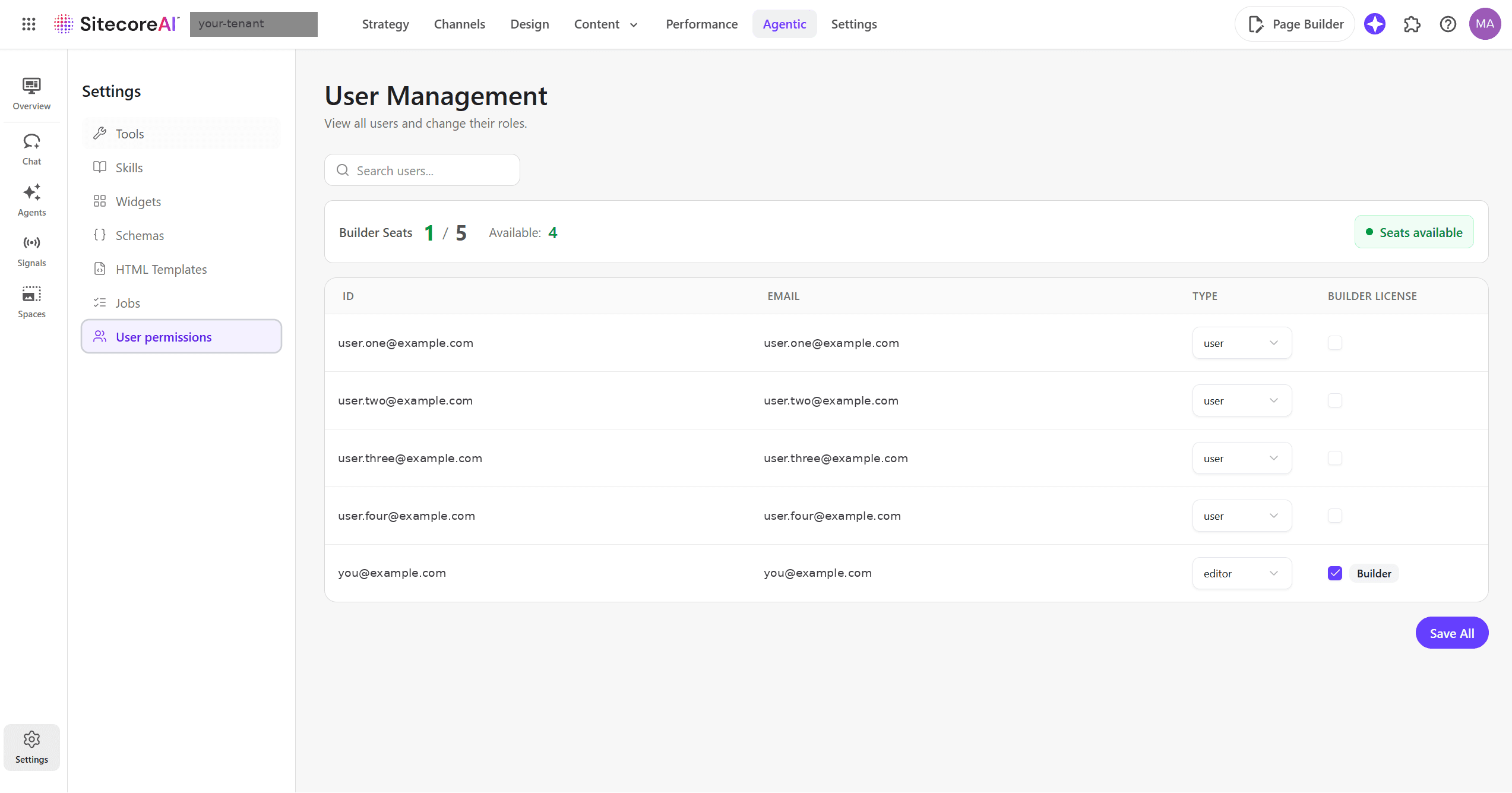
Tick the box against your own account before you start building anything.
Why it matters
Without a Builder License you can modify what is already there. With one you can create. Sitecore's own documentation puts it plainly, as a "before you begin" on every page that matters: you need the license to create a standard agent, to create a workflow agent, and again to create an agent by importing a JSON file.
So the difference is not cosmetic. Without it you are editing prebuilt agents. With it you are building your own agents, workflows and widgets. If you are a developer on this platform, you want it on day one.
The bit that catches people out
The license and your role are two separate gates, and they fail in similar-looking ways. Sitecore publish the matrix on Manage users, and it is worth reading properly:
| User | User + Builder | Editor | Editor + Builder | |
|---|---|---|---|---|
| Run an agent | Yes | Yes | Yes | Yes |
| Configure an agent | No | No | Yes | Yes |
| Create a custom agent | No | Yes | No | Yes |
| Duplicate an agent | No | Yes | No | Yes |
Read the middle two columns. A Builder License on its own lets you create but not configure. The editor role on its own lets you configure but not create. Neither one alone gives you a full working setup.
Editor plus Builder License is what a developer actually wants. Ask for both, in those words, or you will get half of it and spend an afternoon assuming a feature does not exist.
Who can actually assign it
Here is the practical bit. You probably cannot do this yourself.
Only Admins can view or manage roles and Builder License assignments in Agentic Studio, and the User permissions page is invisible to everyone else. So you need to find someone with admin rights in the Sitecore Cloud Portal — an Organization Admin or Organization Owner. In the Cloud Portal under Admin > Users, the Individual access column tells you who they are:
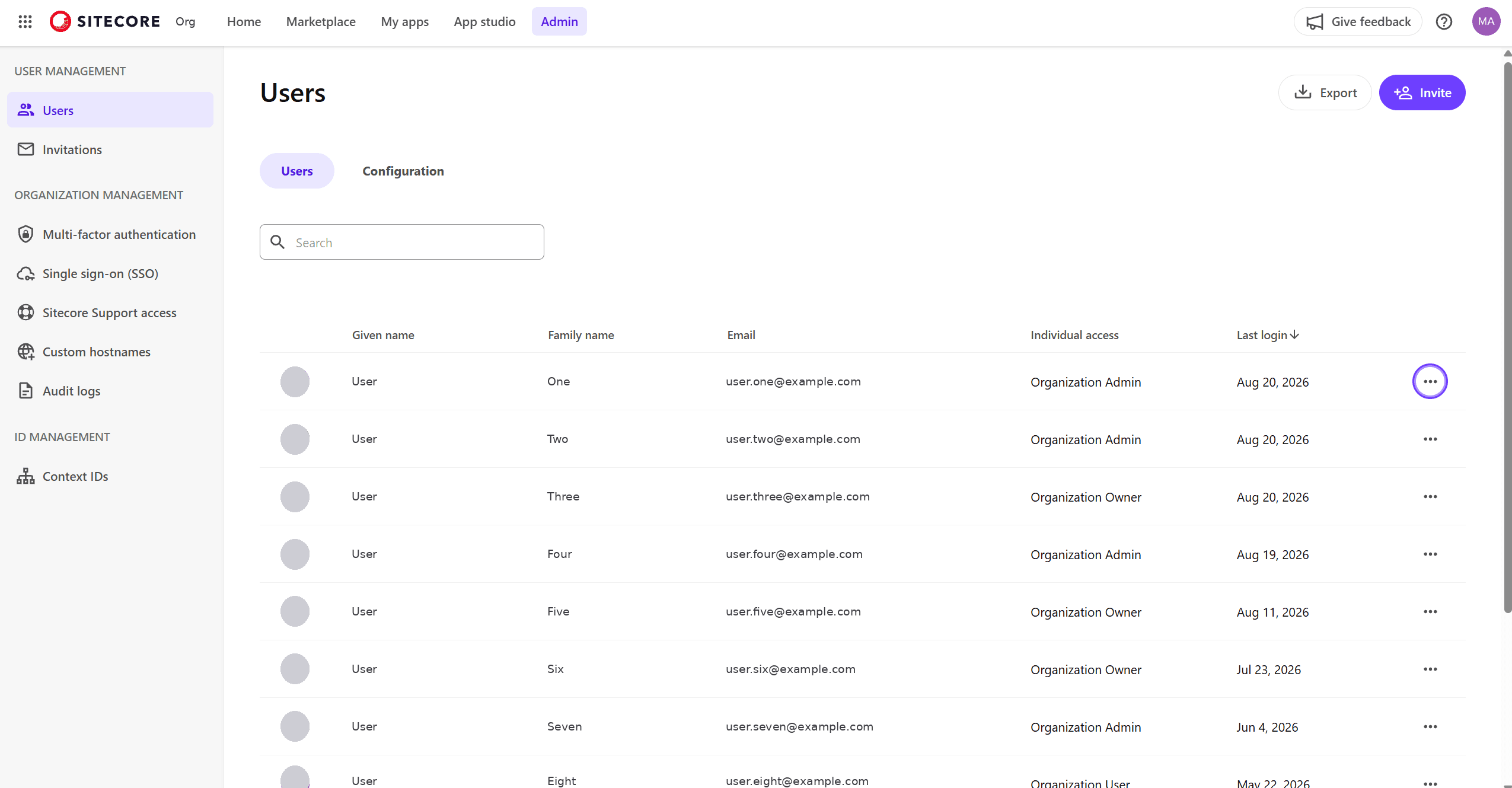
That is your shortlist. Go and ask one of them.
One trap on top of that. Existing organisation admins only appear in the Agentic Studio user list after they have opened Agentic Studio at least once. So your admin can be a genuine Organization Owner, log in, and still not find themselves or you in that list. Get them to open Agentic Studio first, then look.
Seats can therefore sit unassigned for weeks while a whole team concludes the tenant has none. Availability on the tenant is not the same as assignment to your account, and only the second one lets you build.
How to tell if you have a Builder License
There is a good record of what the Builder License unlocked and almost none of what the tenant looked like without one. That is the line to hold onto: without the license you only have the ability to edit. The clear signs people can check come from the licensed side, plus the admin page that states it directly.
Here are five checks, strongest evidence first. Each one says where the evidence comes from.
- Agentic > User permissions (admins only). Sitecore's documentation says your row reads Builder in the Builder License column.
- The Agents page. Sitecore's documentation says there is a way to create a custom standard or workflow agent. We never saw this option missing without a license.
- Any agent's card or menu. Sitecore's documentation lists Duplicate as a permission. We only used it while licensed.
- Open a duplicate, then the Workflow tab. We saw Add Step, delete and Run on the canvas, and saving reads Update Workflow. We saw this while licensed.
- Create a space. Sitecore's documentation says the create flow needs the Builder License. We never tested it.
What we saw, with and without
The left column covers 24 to 28 July, without a license. The right covers 29 July onward, with a license and the Editor role. Everything below is what we saw in the tenant, and "No record" means exactly that.
| What | Without a license | With a license and the Editor role |
|---|---|---|
| Prebuilt agent (AEO/SEO Researcher) | Shown as Installed, with no more-actions menu and no Edit option. Schemas, Parameters, HTML Templates and Workflow could not be reached. | The original prebuilt was never reopened to check. |
| Duplicate of that prebuilt | No record. | A fully editable Workflow canvas with Add Step, delete and Run. It has a Workflow ID and saves via Update Workflow. |
| Custom agent | No record. | One was created (Page Metadata Editor, 30 July) with editable Instructions, Tools, Sitecore Page Tools, Allowed Items, Brand kit and Schemas. |
| Schemas | Not reachable on the prebuilt. | An Add Schema screen, including a Business Context selector that appears on Add only, not on Edit. |
| Multi-step flow | Built as chained plain chats passing artifacts, because the workflow editor is gated. | The Workflow canvas is available. |
Two caveats
- The license and the Editor role are separate gates. A Builder License lets you create agents. Editing an existing prebuilt agent also needs the Editor role. Someone with only one of the two sees a partial set of the signs above. The documentation's permissions table lists this split, but we could not confirm each cell.
- Only admins can see the User permissions page. If you are not an admin you cannot tell whether seats exist or whether one is assigned to you, so checks 2 to 5 are all you have.
The trap
Do not read "no Edit button" as proof that you have no license. I saw no Edit option on a prebuilt agent, and there were two possible causes that were never told apart: no license, or vendor-published agents being locked regardless of license. Treat it as a reason to run the checks above, not as the answer.
Five seats is a message
The other half of this tip. Do not design as though everyone will have what you have.
Five is what you get by default, and you can buy more, but the number is a signal about intent. This is not a general-use allocation.
If you build something that assumes your level of access, most of your team will hit a wall you cannot see from where you are sitting. Look back at that matrix: a plain User can run your agent and nothing else. Whatever you create should still be usable and runnable by someone holding only a user role, because that is what most of them will have.
Check who actually holds a seat before you decide who your work is for.
Related
- Agentic Studio: Agent Export Drops These Fields - you need the license to create an agent by importing a JSON file
- Agentic Studio: Widgets Do Not Export - with a Builder License you build your own widgets, and they have no export
- The AI Project Lifecycle Hiding in Plain Sight Inside Sitecore Agentic Studio - how agents and flows fit into the wider lifecycle
References
- Manage users and Builder licenses — Sitecore documentation
- Working with Agentic studio: before you begin — Sitecore documentation
- Create a standard agent — Sitecore documentation
- Edit agent configuration — Sitecore documentation