
- Published on
Agentic Studio: Stage 2: Doing More by Typing Less
- Authors

- Name
- Matt Lam
Context Engineering is about putting the detail needed for full context into highly reusable artefacts. In SitecoreAI Agentic Studio, those artefacts are a Brand Kit and a skill. In the video, I said the aim is to type less into the prompt but still give the agent more context than in Stage 1.
Below is the video. Please watch it before you read the blog. What I write here is an editorial conversation about the extras I felt needed elaborating from the video.
- Quality it adds
- Actionable
- What gets built
- A plain chat: no agent, no tools ticked, no MCP.
- Designed to show
- Natural language alone can do the job, at the cost of human effort and consistency.
Further reading: Anthropic, Prompt engineering overview (opens in a new tab)
How much does a casual bouldering session cost in Adelaide?
- Page
- /climb/casual-entry on matthelam Boulderfest, a fictional Adelaide bouldering gym
- Fields
- Page title, meta description, Open Graph title, Open Graph description, JSON-LD structured data
- Starting values
- Title and Open Graph title "Casual entry"; the other three empty
- Facts allowed
- Only what the page states: adults $28, concession $24, under 15 $20, shoe hire $6, free chalk, 10-visit pass $250, five-minute safety induction, six zones
- Scored by
- The Agentic Studio chat itself, out of 10
- Quality it adds
- Quality
- What gets built
- The same chat, with the Boulderfest Brand Kit attached, an Optimise page SEO skill, and the Sites, Pages, Content and Brand Kits tools ticked.
- Designed to show
- Rules and facts moved out of the prompt and into context make the output better without retyping them.
Further reading: Andrej Karpathy on context engineering over prompt engineering (opens in a new tab)
How much does a casual bouldering session cost in Adelaide?
- Page
- /climb/casual-entry on matthelam Boulderfest, the same page as stage 1
- Fields
- Page title, meta description, Open Graph title, Open Graph description, JSON-LD structured data
- Starting values
- As at stage 1: title and Open Graph title "Casual entry"; the other three empty
- Facts allowed
- Only what the Brand Kit's Products, prices and facts subsection states
- Scored by
- The Agentic Studio chat itself, out of 10
- Quality it adds
- Repeatability
- What gets built
- A standard agent: named page in, structured output out, a scorer check, a gauge widget.
- Designed to show
- The same input gives the same shape of answer, checked by a tool rather than by eye.
Further reading: Anthropic, Effective harnesses for long-running agents (opens in a new tab)
Pending release
- Quality it adds
- Reliability
- What gets built
- A workflow agent that rewrites, scores and retries to a target, then waits for approval.
- Designed to show
- The agent keeps going until the work meets the bar, not until a person tires of asking.
Pending release
- Quality it adds
- Scalability
- What gets built
- A workflow that invokes agents across the whole page set, ending in approval.
- Designed to show
- One person can run the job over many pages, with the quality of stages 2 to 4 held per page.
Further reading: Anthropic, How we built our multi-agent research system (opens in a new tab)
Pending release
Additional notes on the Brand Kit
The Brand Kit is a specialised interpretation of the company's marketing guidelines, in SitecoreAI's Brand Kit format. Because it's an artefact, the marketing team can share and update it before it goes into SitecoreAI.
The point of context is to remove the need to type the prompt, to the point where you shouldn't even need to copy and paste. Instead, the agent refers to documents that are, hopefully, officially approved and maintained by the company. They hold far more detail than you'd want to paste in every time.
Be aware of Enrich from knowledge
There's an Enrich from knowledge button for the whole kit at the top right of the Sections tab, and one on each section and subsection.
- Enrich from knowledge overwrites every unlocked subsection. Subsections are AI editable by default, and enrichment repopulates them.
- Lock the subsections you've written by hand. Set them to Non AI editable, and Sitecore's docs say "the content will not be modified".
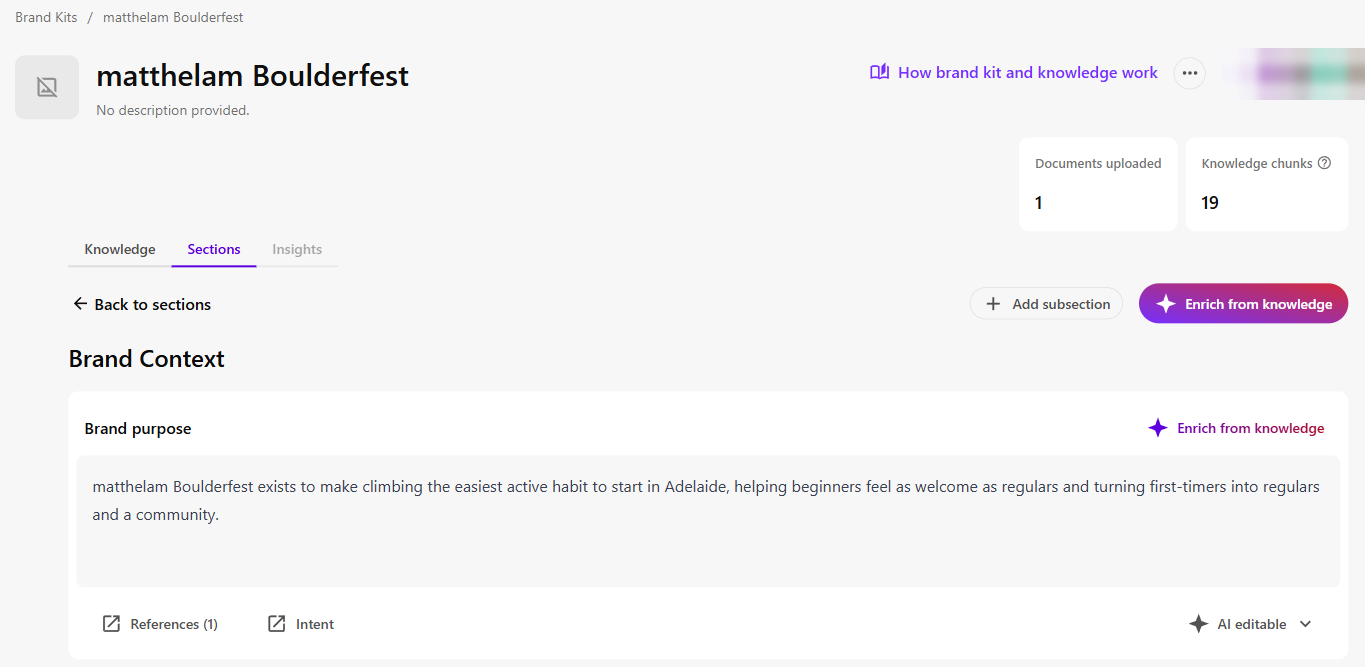
- 1Enrich from knowledge, for this sectionThe Sections tab has one more, for the whole kit.
- 2Enrich from knowledge, for one subsection
- 3AI editableThe default. This is the control you change to lock a subsection.
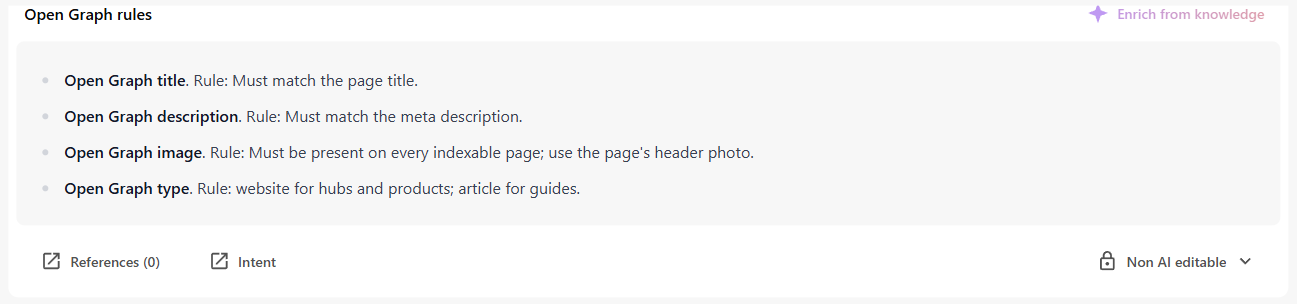
- 1Enrich from knowledge, greyed out
- 2Non AI editableThe lock. Set it on every subsection you have written by hand.
Enrich from knowledge suits guidelines that weren't written for Agentic Studio, when you want to seed a kit quickly. If you've curated a kit that already ticks the boxes, leave it alone.
Enrichment also happens on the initial upload. SitecoreAI summarises your guidelines into the sections, and in our tests the summary dropped the precise data, such as each page's primary question and the prices table. So after the upload, paste your own curated versions back into those sections and lock them. It's a quirk, so manage it closely at first.
Do's and Don'ts
Do's and Don'ts are the beginnings of a harness. AI can do many things, so this section says clearly what we expect it to do and not do. Mine are mostly about words, language and ideas that the brand guidelines can't endorse. They won't catch everything the first time, so tune them as you learn how to work with your AI.
In the video, I said I'd give more detail here. These are the Do's and Don'ts in the Boulderfest Brand Kit document that I uploaded. The document gives each rule with one example, and I've kept an example only where the rule needs one.
Brand and naming
- Do write "matthelam Boulderfest" in full on first mention, then "Boulderfest".
- Don't capitalise "matthelam" in text or split the brand name.
- Do use the canonical product names, for example "Intro to bouldering", not "beginner class".
- Don't invent products, tiers or offers.
Facts and claims
- Do state prices exactly as listed, with the dollar sign.
- Don't round or estimate a price, or use "from" unless the fact table does.
- Do say memberships start "from $65 a month".
- Don't say memberships can be cancelled "any time".
- Don't use unsupported superlatives.
- Don't make health or safety guarantees.
Tone and language
- Do speak to beginners first.
- Do explain a climbing term the first time it appears.
- Don't use fear or difficulty to sell.
- Do address the reader as "you" and the gym as "we".
Search and metadata
- Do answer the page's main question in the first sentence of the meta description.
- Don't repeat the page title in the meta description.
- Do keep titles to 60 characters or fewer and end them with "| Boulderfest" or "| Boulderfest Adelaide".
- Don't add ratings, reviews or awards to structured data.
- Don't save metadata by display name.
The document also has rules for the Brand Assistant and for translation.
When the kit filled its Do's and Don'ts section from the document, it condensed all of these into one Do line and one Don't line. That's the card you see in the video:
- Do: "Use "matthelam Boulderfest" on first mention, then "Boulderfest"; sound welcoming, plain, encouraging, direct, and warm; use short everyday language; be confident about facts and prices; use a personal tone; state prices exactly; describe membership pricing correctly; keep social claims factual."
- Don't: "Don't sound cliquey, technical, hype-driven, vague, corporate, or salesy; use exclamation marks, superlatives, slang, fear-based language, unsupported claims, safety guarantees, incorrect capitalization, or invented product names; omit price; assume prior climbing knowledge; use marketing language."
The general rules carried over, along with lines from our Tone of Voice section. The precise ones didn't: the canonical product names, the specific pricing and membership rules, such as when to say "from" and "cancel with 30 days' notice", and every search and metadata rule.
Most of the search and metadata rules sit in the kit's Global Goals section instead, pasted in word for word from the document and set to Non AI editable. They cover the title, the meta description, the Open Graph fields and the field IDs. In the recorded run, the agent's suggestions kept to them. The title it proposed is 55 characters and ends with "| Boulderfest Adelaide". The description gives the prices exactly, $28, $24 and $20, and opens by answering what casual bouldering costs in Adelaide. The save went to field IDs, not display names.
What reaches the agent
The kit is split into sections. In our testing, a chat with the kit attached pulled in only Brand Context and Tone of Voice on its own. It does this by itself, so I couldn't confirm why or how. Global Goals, which holds our SEO rules, wasn't one of them.
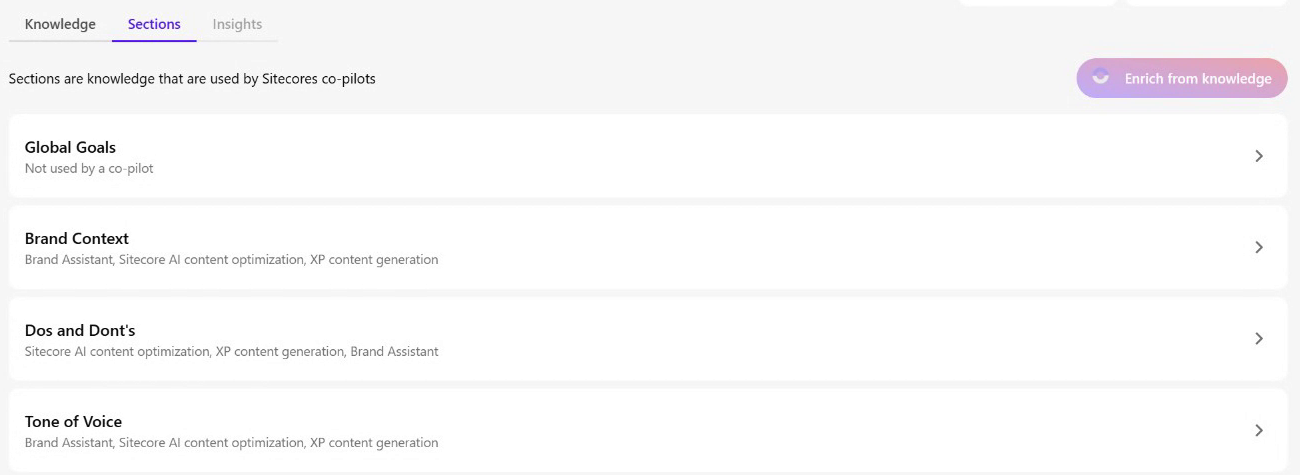
- 1Global Goals: Not used by a co-pilot
- 2Brand Context, Do's and Don'ts and Tone of VoiceEach lists the co-pilots that use it.
We found that you probably have to tick the get_brand_kit_section tool in the chat, then name the sections you want as context. Our skill names Global Goals and tells the agent to fetch it. I'll say more about the Brand Kit tools in the next stage.
The skill
At this stage, the skill describes the workflow we want the agent to go through, so it reads in more technical language than the kit.
I've included the entire skill text I used, for you to copy in and try yourself if you have a SitecoreAI licence. Placeholders mark where to fill in information from your own instance. Work through how it runs, and try changing the instructions.
In the skill, the Brand Kit document is called the Brand Book.
The full skill (copy and adapt)
# Optimise page SEO

Use this skill when someone asks to optimise, improve or fix the SEO of a page on <YOUR_SITE_NAME>, including its meta title, meta description, Open Graph fields or structured data.

The person may be new to SitecoreAI. Guide them through the procedure one step at a time.
Explain each step in plain words, do the work, then stop and wait for their answer. Step 1 has
no checkpoint: go straight on to step 2 in the same reply. Never skip a checkpoint, and never
treat an answer to one checkpoint as approval for a later one.

## Sources

The rules and facts live in the <YOUR_BRAND_KIT_NAME> brand kit (the <YOUR_BRAND_BOOK_NAME>). Retrieve them with
the Brand Kits tools (list_brand_kits, get_brand_kit, get_brand_kit_section); do not rely on
memory. Global Goals is not passed to the chat with the kit, so always fetch it. If you cannot
find the page's entry, say which one, and ask the person before going on.

| What | Brand kit section > subsection |
|---|---|
| The page's primary question | Global Goals > One page, one primary question |
| The page's expected top 10 search terms | Global Goals > Search vocabulary: expected top 10 per page |
| Title rules | Global Goals > Page title rules |
| Meta description rules | Global Goals > Meta description rules |
| Open Graph rules | Global Goals > Open Graph rules |
| Structured data type and required properties | Global Goals > Structured data (SchemaOrgJSON) |
| Which fields the site renders, by field ID | Global Goals > Page SEO fields (also Fields in scope below) |
| What SEO work must never do | Global Goals > What SEO work must never do |
| Prices, times, ages and facilities | Brand Context > Products, prices and facts (quote exactly) |
| The check before applying | Checklist > Page metadata checklist |

Read the page itself with the Sites, Pages and Content tools.

## Fields in scope

Evaluate these five fields on the page's content item every time. They are the only SEO fields
the site renders. Identify each one by its field ID, not by its display name.

| Field | Content Editor section | Field ID | Renders as |
|---|---|---|---|
| <FIELD_NAME_META_TITLE> | <SECTION_PAGE_META> | <FIELD_ID_META_TITLE> | `<title>` |
| <FIELD_NAME_META_DESCRIPTION> | <SECTION_PAGE_META> | <FIELD_ID_META_DESCRIPTION> | meta description |
| <FIELD_NAME_SCHEMA_JSON> | <SECTION_PAGE_META> | <FIELD_ID_SCHEMA_JSON> | JSON-LD |
| <FIELD_NAME_OG_TITLE> | <SECTION_OPEN_GRAPH> | <FIELD_ID_OG_TITLE> | og:title |
| <FIELD_NAME_OG_DESCRIPTION> | <SECTION_OPEN_GRAPH> | <FIELD_ID_OG_DESCRIPTION> | og:description |

The item also has a second set of SEO fields that the site does not render. Never read from or
write to them, even though their names look similar:

| Field | Content Editor section | Field ID |
|---|---|---|
| <FIELD_NAME_BASE_METADATA_TITLE> | <SECTION_BASE_METADATA> | <FIELD_ID_BASE_METADATA_TITLE> |
| <FIELD_NAME_BASE_METADATA_DESCRIPTION> | <SECTION_BASE_METADATA> | <FIELD_ID_BASE_METADATA_DESCRIPTION> |
| <FIELD_NAME_BASE_OG_TITLE> | <SECTION_BASE_OPEN_GRAPH> | <FIELD_ID_BASE_OG_TITLE> |
| <FIELD_NAME_BASE_OG_DESCRIPTION> | <SECTION_BASE_OPEN_GRAPH> | <FIELD_ID_BASE_OG_DESCRIPTION> |

Change no other field.

## Working rules

- Read values from the content item, by field ID.
- Write EMPTY for a field that exists with no value, and NOT RETURNED for a field your tools did
  not give you. Never guess a value.
- If any of the five is NOT RETURNED, say which, treat its current value as unknown, and carry on.
  Never fill the gap from a field with a similar name. At step 5, list those fields again so the
  person knows their old values were not read, and still save only to the field IDs above.
- A title ends with "| <TITLE_SUFFIX>" or "| <TITLE_SUFFIX_ALT>". Only the home page carries the
  full brand name, "<YOUR_SITE_NAME>" (Page title rules <TITLE_RULE_NUMBERS>).
- Every fact must match Products, prices and facts. If the page disagrees with the Brand Book,
  say so; do not choose silently.
- Save nothing until the person says yes at step 5.
- The page tools do not return <FIELD_NAME_META_DESCRIPTION>, <FIELD_NAME_OG_TITLE> or <FIELD_NAME_OG_DESCRIPTION> when they
  read the page back. If a save reports that it could not confirm them, that is expected: say the
  save went through, list those fields, and ask the person to check them in the Content Editor. Do
  not retry the save.
- Do the work yourself. Do not hand any step to another agent.
- Do not publish. The person publishes.

## Procedure

**Step 1. Get the page.** Find the page the person named. Report its item path, the current
value of each of the five fields, and the facts the page states. No checkpoint: go straight on
to step 2 in the same reply.

**Step 2. Analyse.** Find the page's primary question and expected top 10 in the Brand Book, and
quote both exactly.
Score each field out of 10 (this skill's own scale, not <YOUR_SEO_TOOL>'s) against them and the
SEO rules, and say what is wrong and why it matters. Do not propose values yet.
Checkpoint: ask whether this is the right page, and whether the analysis looks right or anything
is missing. Wait.

**Step 3. Suggest.** Propose a value for each field that follows the Brand Book's rules and
structured data table. Show a table of field, value and character count, then the JSON-LD in a
code block.
Checkpoint: ask the person to approve, or to say what to change. Wait.

**Step 4. Review.** Run the brand kit's Page metadata checklist on your proposal, row by row.
Count the characters yourself. Fix anything that fails and list what you changed. Change nothing
that passed: every change must name the checklist row it fixes.
Checkpoint: ask the person to approve the final values. Wait.

**Step 5. Apply.** Show exactly what will change, field by field: field name, field ID, old value
(or "not read" if it was NOT RETURNED) and new value. Ask:
"Shall I save these five fields?" Wait. Save only after the person says yes, to the five field
IDs above, then report what was saved and to which field ID. Save with the Pages tool
update_page_content, giving each field by its field ID. Copy every field ID exactly from the
Fields in scope table, all 36 characters, and check each one against the table before you save:
a wrong ID fails the save. Do not use update_page_metadata: it
cannot take field IDs, and in our tests it never changed the five rendered fields. If a save tool reports a field that
is not one of the five, say so at once.

**Step 6. Publish and re-check.** Ask the person to publish the page in Sitecore and to tell you
when it is done. Then read the five fields again by field ID, check them against the checklist and score
them as in step 2. If a field is still NOT RETURNED, say the chat cannot verify it and ask the
person to check it in the Content Editor. Remind the person that the page's search score is measured outside this
chat.
Checkpoint: ask the person to confirm the re-check. Wait.

## Quality checks

- Steps 2 to 6 each ended with a checkpoint question and a wait.
- Nothing was saved before the yes at step 5.
- No field outside the five was changed, and none of the second set was touched.
- Every fact matches Products, prices and facts.
For each field ID, use the Item ID in the field item's Quick Info section in the Content Editor, without the braces.
Rules in both the kit and the skill
Some rules, and some implied values or intent, sit in both the kit and the skill. Think about it as a developer would. The technical side and the marketing side sometimes own aspects of the same thing, so you can put it in both, phrased from a different angle.
As a starting point, some duplication reinforces the instructions. It can also introduce bugs or overemphasis, so iterate, test, and change or remove it where needed.
Name it
In context engineering, it's better to name something than to let the agent auto-select it. Skills are the key case. If you want a skill to run, name it in the prompt. The same goes for the Brand Kit: name the sections you need. I explain why in the video's "Hot tip: name the skill" chapter (05:23).
The prompt and its tools
SitecoreAI's agents work with pages and items through the functions in the Invoke Tool reference, such as get_page_metadata. In the recorded run, the chat called list_brand_kits, get_brand_kit and get_brand_kit_section for the kit, search_pages and get_page_content to read the page, and update_page_content to save it.
The prompt and the context implied some of those calls. For others, we had to select tools for the chat. That doesn't really fit context engineering, so I'll cover it in Harness Engineering.
When a field comes back NOT RETURNED
In the recorded run, the page read gave the chat only two of the five fields. It marked MetaDescription, OpenGraphTitle and OpenGraphDescription as NOT RETURNED and scored each 0, because it couldn't assess them. Its reply said: "The page tool does not return the three marked fields, so their current values are unknown rather than assumed empty."
That's the skill's working rule at work. It tells the agent to write NOT RETURNED for a field its tools didn't give it, and never to guess a value. The save still went to all five fields, and the Content Editor showed them saved.
So why does the page read leave those three out? We reproduced it in a fresh chat with Agentic Studio's debug mode on, and expanded the Get Page Content row to see its raw output. The read returns the page's fields by name, 35 of them, and MetaDescription, OpenGraphTitle and OpenGraphDescription aren't among them. Get Page Metadata doesn't return them either.
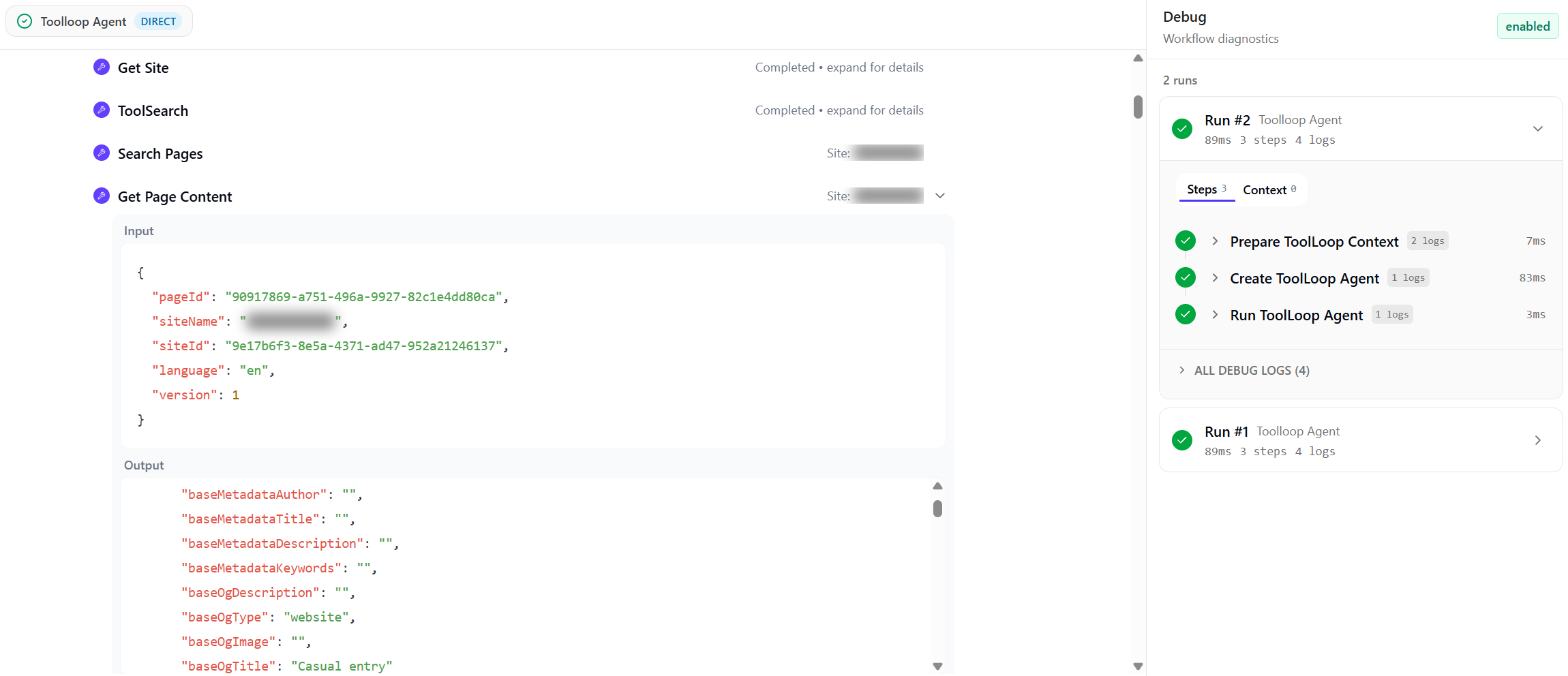
- 1Debug mode, enabled
- 2Get Page Content, expanded to show its input and output
- 3The end of the outputOnly the base fields. MetaDescription, OpenGraphTitle and OpenGraphDescription are missing.
The split follows the template that each field comes from. The read leaves out every field from Sitecore's site metadata templates for SXA: the three we need, plus Page keywords and the Twitter fields. Every field from the site's own templates comes back, empty or filled.
It isn't the field names, the field settings or what the site renders. The similarly named base fields come back with the same types and settings, and the site doesn't even render those.
So the agent could write what it couldn't read, because the save names each field exactly, by its field ID. Why the read skips those templates, I don't know. That's one to confirm with Sitecore.
Can we trust the agent's scoring?
The skill has the agent score each field out of 10, on its own scale. Sitecore's internal agent does the scoring, but with this much context it's a good starting point for teams beginning to run their own SEO in Agentic Studio. In the video, I said the score was a reasonable starting point. I cover this in more depth in the "Is the analysis reliable?" chapter (07:59).
In summary
Context engineering in SitecoreAI feeds the prompt with artefacts that hold much more official, approved and curated context, through two features, the Brand Kit and skills. The Brand Kit holds the marketing side of the context. The skill holds the process or workflow, and usually reads as more technical.
At the end of the day, we're still mostly working off prompts, but we've made them more consistent and more detailed, and easier to achieve.
Stage 3 is Harness Engineering. It's about steering the agent through the choices and options it has access to, which should reduce the context and prompting further.